Can only get to Nimbus Isle
- This topic has 10 replies, 4 voices, and was last updated 11 years ago by .
Viewing 11 posts - 1 through 11 (of 11 total)
- You must be logged in to reply to this topic.
Home › Forums › Help and Support › Can only get to Nimbus Isle
I have the 0.5.1 server running and the updated Lego Universe client and can log-in and play Lego Universe fine. I cant seem to get to a world other than Nimbus Isle though. I tried the world changer and changing the characters but all it does is say its going to another world for example “Ninjago” but then spawns me in Nimbus Isle anyway. Is this supposed to happen?
No, it’s not. Did you actually try changing the hex values yourself? And what client and server are you using?
The latest client on your download page and the 0.5.1 server.
I did try to change the hex values in notepad ++ but the page was just a bunch of random symbols
If you want to change the hex values in Notepad ++, you will need the hex editor plugin installed. Then you need to change some numbers (look at the Q&A).
As long as you hope, you can.
XYQuadrat
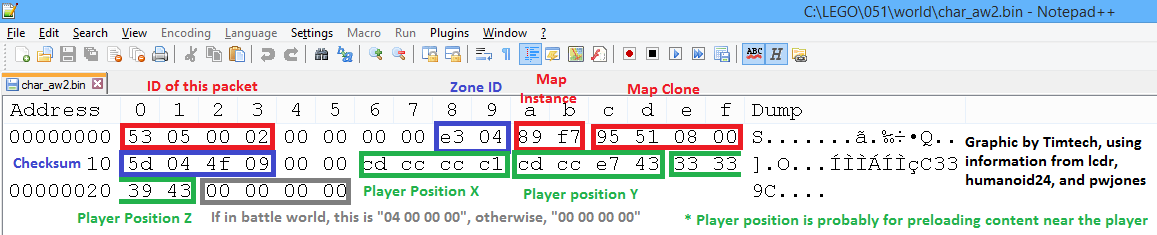
Here is what you should see when you edit world\char_aw2.bin with Notepad++’s HEX Editor plugin:

The blue boxes show you the data that you are interested in: the world’s hex ID, and its checksum.
Ah, ok. Thanks Timtech and XYQuadrat. That solved my problem.
It still doesn’t seem to work.
Here is a screen shot of what the server says when I enter a world and what I entered into the world file. I was trying to go to Venture explorer.
Do you think its my client?

Well, you have the “Nexus 2” client, correct?
Actually you might just have edited the wrong file. Your Notepad++ says you are editing the “world/gruntmonkey/char_aw2.bin” but the game loads CheekyMonkey. If you have that file, try editing “world/char_aw2.bin”
I do have the Nexus 2 cilent, Ok I will try editing the other file to see if that works.
It worked when I editied CheekyMonkey, I guess not editing CheekyMonkey was the problem.
Thanks for the help.
Comments are currently closed.