LEGO® Universe Nuevamente Imaginado
Menu
  • Inicio
  • Descargar
    • Música
  • Foros
  • Info
    • World
    • FAQ
    • Objects
  • Tutorial
    • Compile in Visual Studio
    • Servidor 0.3
    • Servidor 0.4 (Pre-2)
    • Servidor 0.5.1
  • Inicio
  • Descargar
    • Música
  • Foros
  • Info
    • World
    • FAQ
    • Objects
  • Tutorial
    • Compile in Visual Studio
    • Servidor 0.3
    • Servidor 0.4 (Pre-2)
    • Servidor 0.5.1

Can only get to Nimbus Isle


Inicio › Foros › Help and Support › Can only get to Nimbus Isle

  • Este debate tiene 10 respuestas, 4 mensajes y ha sido actualizado por última vez el hace 10 años, 5 meses por DragonPixel.
Viendo 11 entradas - de la 1 a la 11 (de un total de 11)
  • Autor
    Entradas
  • septiembre 12, 2015 a las 2:44 pm #725
    DragonPixel
    Participante

    I have the 0.5.1 server running and the updated Lego Universe client and can log-in and play Lego Universe fine. I cant seem to get to a world other than Nimbus Isle though. I tried the world changer and changing the characters but all it does is say its going to another world for example «Ninjago» but then spawns me in Nimbus Isle anyway. Is this supposed to happen?

    septiembre 12, 2015 a las 3:26 pm #733
    Timtech
    Superadministrador

    No, it’s not. Did you actually try changing the hex values yourself? And what client and server are you using?

    septiembre 12, 2015 a las 3:28 pm #735
    DragonPixel
    Participante

    The latest client on your download page and the 0.5.1 server.

    I did try to change the hex values in notepad ++ but the page was just a bunch of random symbols

    septiembre 13, 2015 a las 2:36 am #745
    XYQuadrat
    Moderador

    If you want to change the hex values in Notepad ++, you will need the hex editor plugin installed. Then you need to change some numbers (look at the Q&A).

    As long as you hope, you can.
    XYQuadrat

    septiembre 13, 2015 a las 12:46 pm #752
    Timtech
    Superadministrador

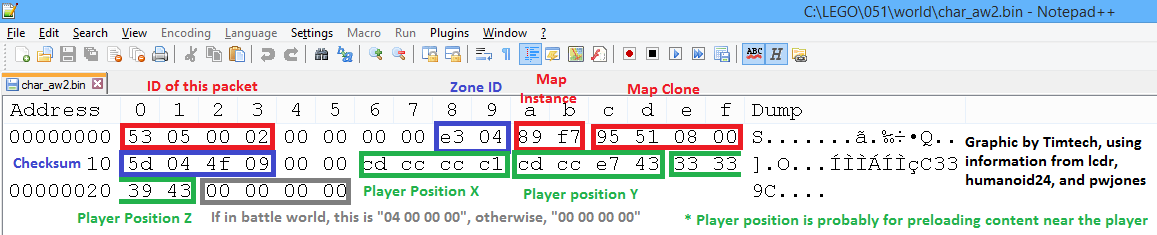
    Here is what you should see when you edit world\char_aw2.bin with Notepad++’s HEX Editor plugin:

    world-char_aw2

    The blue boxes show you the data that you are interested in: the world’s hex ID, and its checksum.

    septiembre 13, 2015 a las 2:11 pm #754
    DragonPixel
    Participante

    Ah, ok. Thanks Timtech and XYQuadrat. That solved my problem.

    septiembre 13, 2015 a las 4:43 pm #763
    DragonPixel
    Participante

    It still doesn’t seem to work.

    Here is a screen shot of what the server says when I enter a world and what I entered into the world file. I was trying to go to Venture explorer.

    Do you think its my client?

    LUNI Server

    septiembre 13, 2015 a las 5:57 pm #767
    Timtech
    Superadministrador

    Well, you have the «Nexus 2» client, correct?

    septiembre 13, 2015 a las 6:16 pm #769
    Xiphoseer
    Moderador

    Actually you might just have edited the wrong file. Your Notepad++ says you are editing the «world/gruntmonkey/char_aw2.bin» but the game loads CheekyMonkey. If you have that file, try editing «world/char_aw2.bin»

    septiembre 13, 2015 a las 6:18 pm #770
    DragonPixel
    Participante

    I do have the Nexus 2 cilent, Ok I will try editing the other file to see if that works.

    septiembre 13, 2015 a las 6:27 pm #771
    DragonPixel
    Participante

    It worked when I editied CheekyMonkey, I guess not editing CheekyMonkey was the problem.

    Thanks for the help.

  • Autor
    Entradas
Viendo 11 entradas - de la 1 a la 11 (de un total de 11)
  • Debes estar registrado para responder a este debate.
Acceder

Comments are currently closed.

Idioma Preferido


  • English (en) English (en)
  • Deutsch (de) Deutsch (de)
  • Español (es) Español (es)

Busca en los Foros


Los Últimos Temas


  • Happy New Year
  • FORUMS CLOSED

Foros

  • General Discussion

Otros Sitios

  • LU Server Projects Github online
  • Community Discord online
  • buscar el LUNIverso

    Tenga en cuenta

    El Grupo LEGO no ha aceptado o autorizado el funcionamiento de este juego y no es responsable de los problemas de seguridad en relación con la operación de este juego.

    © 2015-2021 Proyecto LUNI™ Servidor

    Organizada por TimTech Software